AI toolkit · Claude setup guide

Get ready for Claude: all six tools.

Most people open Claude, type one prompt, get a mediocre answer and leave, because they’ve set up one tool out of six. Here are all six.

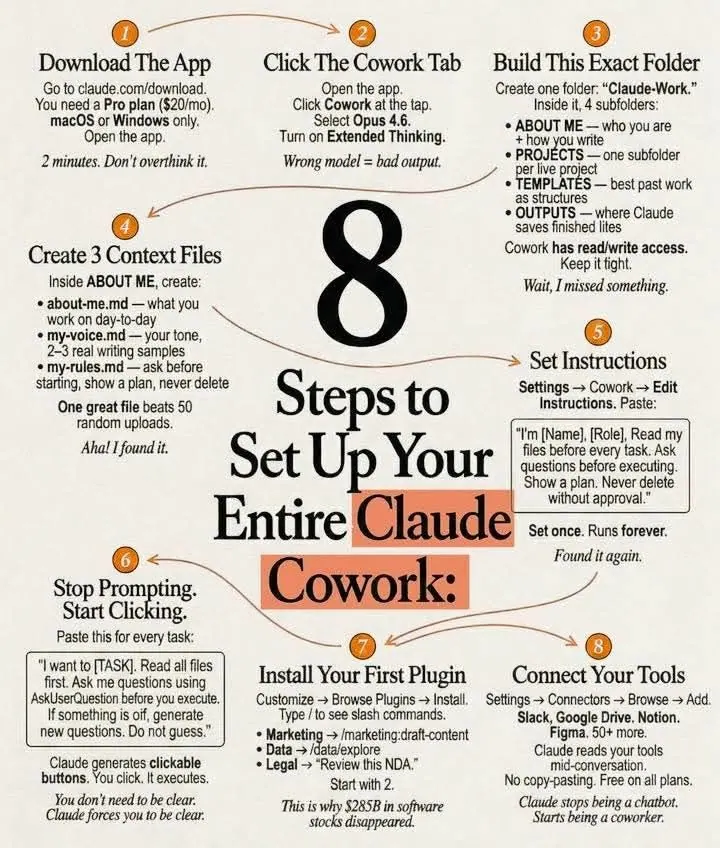
Sandy Carter’s infographic: 8 steps to set up your entire Claude Cowork
  1. 1

    Tool 1: Cowork

    • Download Claude at claude.com/download and open the Cowork tab.
    • Select a folder from your computer.
    • Build your brain file: create about-me.md with who you are, what you do and how you like to work.
    • Start every chat with: Read the files first. Then ask me questions before doing anything.
  2. 2

    Tool 2: Model

    • Pick the most capable model in the model picker. New ones arrive fast, and Sandy covers each release in her Forbes column.
    • Turn on extended thinking. Most people skip this and wonder why Claude feels generic.
    • Go to Settings › Connectors and link Slack, Google Drive and Notion.
    • Claude now reads your actual workspace.
  3. 3

    Tool 3: Excel

    • Open Excel and go to Insert › Get Add-ins. Search for “Claude by Anthropic” and install it.
    • Open any spreadsheet and ask: Give me a summary of each tab.
    • Claude lives inside the spreadsheet. It knows what D14 actually contains.
  4. 4

    Tool 4: Plugins

    • Go to claude.com/plugins and pick the one for your job: marketing, sales, legal, finance or data.
    • Click install, then type / in your next chat.
    • The signal: legal software companies lost $285B in market cap when these dropped.
  5. 5

    Tool 5: Artifacts

    • Nothing to install.
    • Ask Claude to build something: Create an interactive HTML calculator for [thing].
    • You get a working tool inside the chat. Not text, not a suggestion, but a thing you click and use.
  6. 6

    Tool 6: Projects

    • Go to claude.ai, click Projects and create one.
    • Upload your files and add instructions.
    • Every chat inside the project remembers your context.
    • Sandy’s honest take: Cowork replaced this for her, but for teams it still works.

Set up all six. It takes a day. Then you’ll understand why everyone switched.

Keep going

Sandy on Claude at Forbes.

AI first, human always

Can’t get Sandy on the phone? Ask her AI twin.

Sandy practices what she preaches. Her AI digital twin shares her thinking and stories on AI strategy, agents, innovation and leadership, any time of day.

Start a conversation